Bring the numbers to your doctor.

Wakeful is a symptom tracker for narcolepsy and idiopathic hypersomnia. Log cataplexy, sleep attacks, hallucinations and naps in three taps. At your next visit, show one page: how often, and since when.

For iPhone with iOS 26 or later. No account. Your health data stays on your phone.

Cataplexy per week

Example

−50%13.5 a week before the dose change, 6.8 after

Example data. Cataplexy episodes per week for 8 weeks: 14, 13, 15 and 12 before a dose change on Oct 5, then 9, 7, 6 and 5. Dose change −50% Sep 7Oct 5Oct 26
Wakeful reportSep 7 – Nov 1, 2026

Example data. Wakeful counts what you log, week by week, and marks the day a dose changed. Switch the episode type.

What Wakeful is

Wakeful is an iPhone app for people with narcolepsy type 1 or 2 and idiopathic hypersomnia. It keeps a quick log of your symptoms and turns it into one page your sleep doctor can read.

Cataplexy, sleep attacks, hallucinations and sleep paralysis take three taps to log. Naps can be planned, reminded and timed. An evening check-in asks how sleepy you were. It works with any treatment, or none.

If you take oxybate twice a night, Wakeful also rings for dose 2. Its alarms use Apple's AlarmKit, so they ring like your Clock alarm, even in Silent mode and Focus.

Logging, naps and alarms are free. Wakeful Plus ($4.99 a month or $29.99 a year) adds the one-page PDF report, full history, trends, iCloud backup and CSV export. Wakeful never diagnoses, and it never suggests, calculates or changes doses.

3 tapsto log an episode

1 pagefor your sleep doctor

$0for logging, naps and alarms

0 accountsdata stays on your iPhone

Log an episode in three taps

Your doctor will ask how often. Tap +, pick what happened, set how strong it was. Triggers and a note are there when you want them, and the time is filled in for you.

  • Cataplexy severity 1 to 5, triggers
  • Sleep attack how long it lasted
  • Hallucination severity, note
  • Sleep paralysis severity, note
  • Naps up to four planned a day, timer, how rested

Also from the Lock Screen widget and a Control Center button that logs cataplexy in one tap.

Log episode sheet: Cataplexy selected, severity 3 of 5, triggers Laughter, Surprise, Anger, Stress, Other, and a Save button Plan your naps screen: Nap 1 at 11:00 AM for 20 minutes and a 5 minute reminder
Log calendar for November 2026 with the selected day's entries: a nap, a sleep attack and a cataplexy episode
Logging and naps on the left, every night and every episode on the calendar on the right.

One page for the appointment

Your sleep doctor asks how often, how many and since when. The report answers on one page: episodes per week, naps, sleepiness and doses taken, with the date of a dose change marked.

Example data. The PDF, 90-day and custom ranges, trends and CSV export are part of Wakeful Plus; the 7- and 30-day report screen is free.

Wakeful reportOct 6 – Nov 2, 2026

28 days · Night plan 10:30 PM and 1:15 AM · Dose change Oct 20

11cataplexy episodes

4 in the 2 weeks after the dose change, 7 before.

Dose 2 taken27 of 30 nights
Sleep attacks9
Naps per day2.6
Rested after naps3.5 of 5
Sleepiness5.1 of 10

Recorded by the patient in Wakeful. Not a diagnosis.

Take oxybate twice a night? It rings for dose 2.

If your doctor prescribed a twice-nightly oxybate, Wakeful wakes you for the second dose. On a different medicine, skip this part. Everything above works without it.

First, enter the times your doctor gave you.

Dose 1, dose 2 and when you usually wake. Wakeful sets one alarm for each dose and repeats them every night you choose.

Dose 110:30 PM
Dose 21:15 AM
Usual wake time6:30 AM
Wakeful setup screen asking When do you take your doses, with Dose 1 at 10:30 PM, Dose 2 at 1:15 AM and a night timeline

Then, at 1:15 AM, it rings.

Like an alarm, not a notification: it breaks through Silent mode and Focus. Tap Taken and the time is saved. Remind in 10 min rings again later.

Takensaves 1:15 AM
Remind in 10 minrings at 1:25 AM
Stopped without Takenasks again in 5 min
Wakeful Today screen with the night timeline: Dose 1 10:30 PM, Dose 2 1:15 AM, wake 6:30 AM, and the line Last night: dose 2 taken at 1:22 AM

Finally, in the morning, it checks.

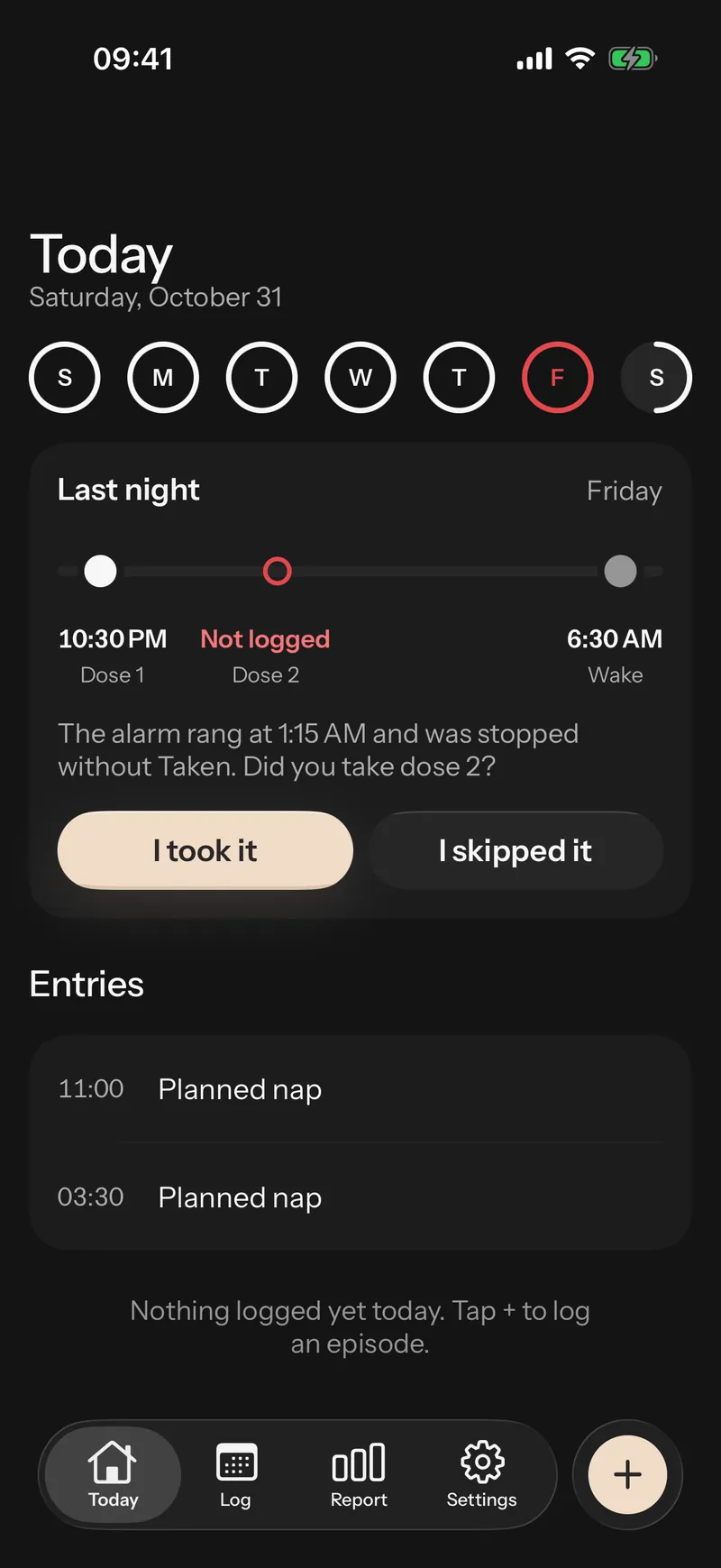
If dose 2 has no answer, Today asks: Did you take dose 2? I took it, or I skipped it. Your log stays true even on the nights you don't remember.

Last nightNot logged
I took itpick the time
I skipped itsaved as skipped
Wakeful morning card: Last night, the alarm rang at 1:15 AM and was stopped without Taken. Did you take dose 2? Buttons I took it and I skipped it

Set it once. It keeps up.

These are real settings in Wakeful. Switch them to see what each one does.

Remind me before each planned nap.

5 minutes before, for up to four naps a day. Start the timer from Today, rate how rested you feel after.

Ask how sleepy I was each evening.

One question, one tap, a score from 0 to 10. It lands in the report next to your doses.

Ring for dose 2 in Silent mode and Focus.

For twice-nightly oxybate. AlarmKit alarms, the same kind as the Clock app, with Taken and Remind in 10 min on the Lock Screen.

Ask again if I stop it without Taken.

A backup notification 5 minutes later, then a question on Today in the morning.

Back up to my private iCloud.Plus

Your own iCloud database through Apple's CloudKit. Only you can read it; there is no Wakeful server.

Health data stays on your phone

No account, no Wakeful server, nothing sold. Doses, episodes, naps and notes live in the app on your phone.

  • No sign-up

    Open the app and set your night plan. There is nothing to log in to.

  • Backup is yours

    With Plus, iCloud backup goes to your own private iCloud database. Only you can read it.

  • No health data in analytics

    Anonymous counts of taps and screens. Never notes, triggers, medication names or dose times.

  • No tracking

    No ads, no data brokers, no cross-app tracking. Read the details in the privacy policy.

Read the privacy policy

Tracking is free. The report is Plus.

Logging, naps and dose alarms never sit behind a paywall. Wakeful Plus adds what you bring to the appointment.

$4.99a month

Everything in Free, plus what you bring to the appointment.

  • One-page PDF report for any date range
  • 90-day and custom report ranges
  • Trends: triggers, weekdays, dose 2 and the next day
  • Full history, not just 14 days
  • iCloud backup and CSV export
Coming soon to the App Store

Billed through your Apple ID. Cancel any time in iOS Settings.

Questions

What is Wakeful?

Wakeful is an iPhone app for people with narcolepsy type 1 or 2 and idiopathic hypersomnia. It keeps a quick log of cataplexy, sleep attacks, hallucinations, sleep paralysis, naps and daytime sleepiness, and makes a one-page report you can bring to your sleep doctor. If you take oxybate twice a night, it also rings for the second dose.

Do I need a twice-nightly medicine to use Wakeful?

No. Logging, naps, the sleepiness check-in and the report work with any treatment, or none. The dose alarm is for people who take oxybate twice a night. You can skip it during setup.

How do I share the report with my doctor?

With Wakeful Plus, the Report tab makes a one-page PDF for the dates you pick. Share it with the iPhone share sheet: AirDrop, Mail, Messages, Files or print.

What is free, and what does Wakeful Plus add?

Free: logging every episode type, planned naps with reminders, the evening sleepiness check-in, the widget and Control Center button, your last 14 days of history, and for twice-nightly oxybate the dose alarms, Taken from the Lock Screen and the morning check.

Wakeful Plus adds the one-page PDF report for any date range, 90-day and custom ranges, trends, full history, iCloud backup and CSV export.

How much is Wakeful Plus?

$4.99 a month or $29.99 a year, billed through your Apple ID. You can cancel any time in iOS Settings. Logging and dose alarms stay free either way.

Where is my health data stored?

On your iPhone. There is no Wakeful account and no Wakeful server. If you turn on iCloud backup (Wakeful Plus), your data is also stored in your own private iCloud database, which only you can read.

Does Wakeful tell me when to take my medicine or how much?

No. You enter the times your doctor gave you. Wakeful never suggests, calculates or changes doses, and it is not medical advice.

Will the alarm ring if my iPhone is on Silent or in a Focus?

Yes. Wakeful's dose alarms use Apple's AlarmKit, so they ring like the alarms in the Clock app, even in Silent mode and Focus. You allow alarms once during setup. AlarmKit needs iOS 26 or later.

What happens if I stop the alarm without tapping Taken?

A backup notification asks again 5 minutes later. If dose 2 still has no answer, the Today screen asks you in the morning: “Did you take dose 2?” You tap I took it or I skipped it, so your log stays accurate.

Log today.
Show your doctor.

Pick what you want to track and start with the next episode. A few weeks later, your doctor gets one page.

Wakeful is a tracking tool, not medical advice. It never diagnoses, and it never suggests, calculates or changes doses. Always follow your doctor's instructions.

What do you want Wakeful to do?

Pick any. You can change this later.

Goals

When do you take your doses? Use the times your doctor gave you.

Wakeful never suggests or changes doses.

Coming soon to the App Store